Understanding Binance position modes
Binance futures offers two position modes for different trading strategies.
One-way Mode
One-way Mode allows a position in only one direction per contract. You cannot hold separate long and short positions in the same contract simultaneously.
Use cases:Trend following, directional trading and simple position management.
One contract · One directionHedge Mode
Hedge Mode allows separate long and short positions in the same contract at the same time, enabling opposing directional exposure.
Use cases:Hedging, arbitrage, grid trading and market-neutral strategies.
One contract · Long and short positionsHedging in Hedge Mode
Opposing long and short positions in the same contract offset directional exposure. Net exposure reflects the difference between the positions rather than their sum. Potential use cases include:
- Cash-and-carry arbitrage — Long spot and short futures.
- Volatility trading — Delta-neutral strategies involving calls and puts.
- Calendar arbitrage — Offset contracts with different expiries.
- Grid trading — Place long and short orders to respond to price movements.
Query position mode with the MQL API
Binance MQL interfaces are defined in MQL5\Include\mt5binance.mqh . The ufGetCurrentPositionMode interface queries the current position mode across all contract symbols.
// 查询用户当前持仓模式接口定义
// 返回值:双向持仓 或 单向持仓
void ufGetCurrentPositionMode(int &handles[], long recvWindow, char &result[]);
MQL5 example
// 示例:获取当前持仓模式
#include <mt5binance.mqh>

// 准备请求句柄数组
int handles[];
long recvWindow = 5000;
char result[];

// 调用查询持仓模式接口
ufGetCurrentPositionMode(handles, recvWindow, result);

// 解析返回结果
string jsonResult = CharArrayToString(result);
Print("持仓模式查询结果: ", jsonResult);
// 返回示例: {"code":200,"data":{"dualSidePosition":true}}
// dualSidePosition = true 表示双向持仓模式
// dualSidePosition = false 表示单向持仓模式
Official documentation
For further details, see the official Binance API documentation:
https://developers.binance.com/docs/zh-CN/derivatives/usds-margined-futures/account/rest-api/Get-Current-Position-Mode
How to switch position mode
Switch position mode in your account settings on the Binance website or app:
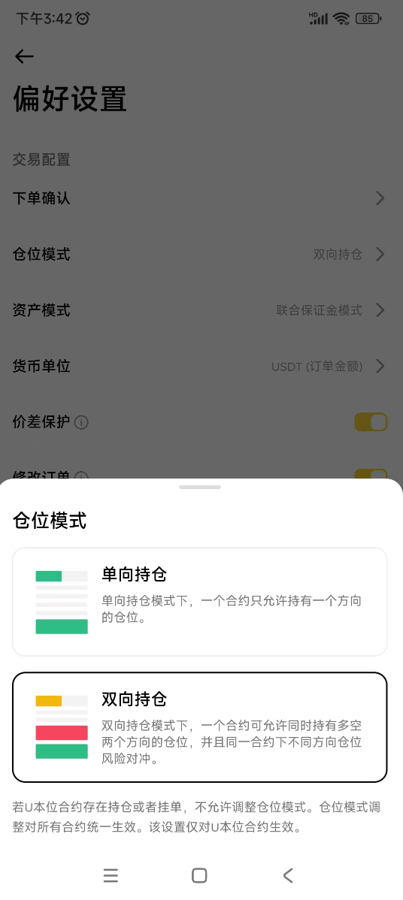
Please note:Before switching, ensure there are no open positions or outstanding orders. You may need to adjust your strategies after changing the mode.
Choose a position mode for your strategy
Choose One-way Mode
• Trend-following strategies
• Simple directional decisions
• Beginner trading workflows
• Scenarios without complex hedging
Choose Hedge Mode
• Cash-and-carry arbitrage
• Market-neutral strategies
• Advanced grid trading
• Volatility strategies
• Delta-neutral hedging
Frequently asked questions
Q: How is margin calculated in Hedge Mode?
A: Margin is calculated for long and short positions separately, while net directional exposure reflects their difference.
Q: Can I switch from One-way Mode to Hedge Mode?
A: Yes. Use Binance account settings after closing positions and outstanding orders.
Q: How do I query the current mode through MQL?
A: Call ufGetCurrentPositionMode. The dualSidePosition field in the response identifies the mode.
MT5 + MQL API support position mode queries
Use ufGetCurrentPositionMode to retrieve the account’s current position mode and adapt your strategy’s risk management and trading logic.
← Back to MT5 Binance