Understanding Binance events
Understand asynchronous Binance notifications and handle account and order events in MQL.
Binance event workflow
Using order placement as an example, the workflow is:
- ① Place an order in MT5.
- ② Binance immediately returns the order response (synchronous)
- ③ If the order rests on the book, Binance later pushes a fill event when it executes (asynchronous)
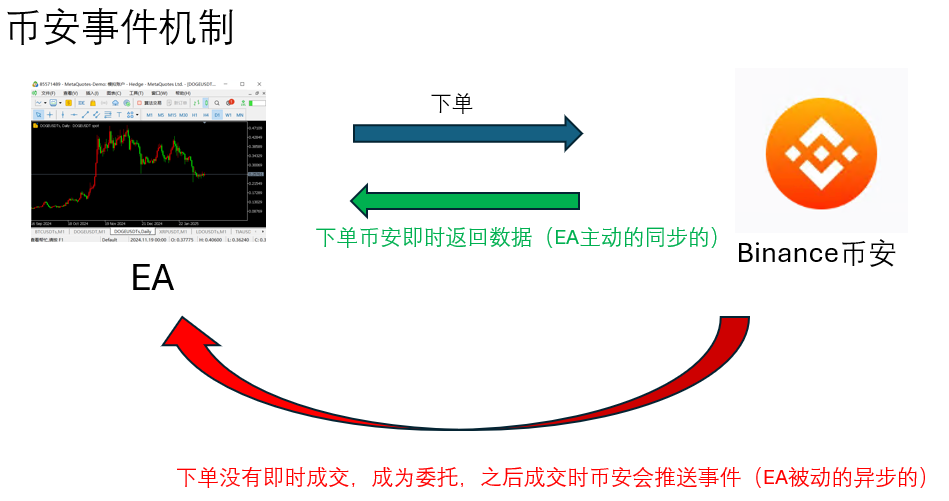
Core concept — Your MQL strategy must handle asynchronous events from step 3. Binance pushes these when order status changes, and the EA must receive and process them.
Binance event types
Binance pushes the following events to MT5:
Account balance changes
Notifications when balances change, including trading profit and loss, deposits and withdrawals.
Position changes
Notifications when position quantity or direction changes, allowing position state updates.
Order trade updates
Notifications of order status changes, such as partial fills, full fills and cancellations.
Order fills
Fill notifications containing execution price, quantity and related information.
Funding fees
Notifications at futures funding settlement, used to track funding payments.
Margin calls
Notifications when additional margin is required, supporting risk alerts.
Leverage changes
Notifications when account leverage changes, allowing risk parameters to be tracked.
Account configuration changes
Notifications of changes to other account configuration parameters.
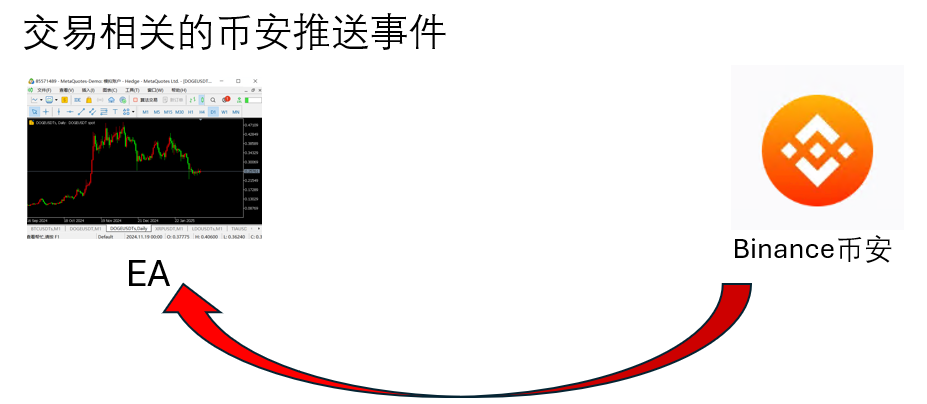
How does an EA receive Binance events?
OnChartEvent is a predefined MQL event handler. MT5 calls it when users interact with a chart, such as clicking, typing or moving the mouse.
This software delivers Binance events through OnChartEvent. The event identifier is 3333, which distinguishes Binance notifications from ordinary chart interactions.
OnChartEvent Example: Receive Binance Leverage Change Events
//get binance call back event via OnChartEvent
//OnChartEvent函数是MQL中的一个预定义事件处理函数,当用户在图表上进行操作(如点击、按键、移动鼠标等),MT5会自动调用此函数
// OnChartEvent is a predefined MQL event handler that MT5 calls for chart interactions such as clicks, keystrokes, and mouse movements.
//本软件可以通过 OnChartEvent函数得到币安异步推送事件
// This software receives asynchronous Binance events through OnChartEvent.
//这些币安事件代号都是 3333,根据该代号可以区分哪些是币安推送事件而非用户在图表上进行操作产生的事件
// Binance events use ID 3333 to distinguish them from events generated by user interactions with the chart.
void OnChartEvent(const int id,
                  const long &lparam,
                  const double &dparam,
                  const string &sparam)
  {
   // 仅处理币安自定义事件,其他图表事件由此判断过滤。
   // Process only Binance custom events and filter out other chart events with this check.
   if(id==3333)   //all binance event ID are 3333  币安推送事件代号都是3333
     {
      // 转换币安事件参数,取得待反序列化的 JSON 字符串。
      // Decode the Binance event parameter to obtain the JSON string for deserialization.
      string  event = processChartEventMsg(sparam);

      CJAVal jEvent;
      // 解析 JSON 供后续按字段名读取;本例此处未检查解析函数的返回值。
      // Deserialize JSON for subsequent field access. This example does not check the parser return value here.
      jEvent.Deserialize(event);

      // 读取 e 字段,表示事件类型,使用 ToStr 转换。
      // Read e for event type using ToStr.
      string e=jEvent["e"].ToStr();

      //Event: Account Configuration Update previous Leverage Update
      //https://developers.binance.com/docs/derivatives/usds-margined-futures/user-data-streams/Event-Account-Configuration-Update-previous-Leverage-Update

      //杠杆倍数等账户配置 更新推送
      //https://developers.binance.com/docs/zh-CN/derivatives/usds-margined-futures/user-data-streams/Event-Account-Configuration-Update-previous-Leverage-Update

      // 账户配置更新推送,ac 对象描述杠杆变化,ai 对象描述联合保证金模式变化。
      // Account configuration update. ac describes leverage changes and ai describes Multi-Assets Mode changes.
      if(e=="ACCOUNT_CONFIG_UPDATE")  //Event Type  事件类型
        {
         // 读取 E 字段,表示事件时间,单位为毫秒,使用 ToInt 转换。
         // Read E for event time in milliseconds using ToInt.
         long eventTime=jEvent["E"].ToInt();    //Event Time 事件时间
         // 读取 T 字段,表示交易时间,单位为毫秒,使用 ToInt 转换。
         // Read T for transaction time in milliseconds using ToInt.
         long transactionTime=jEvent["T"].ToInt();    //Transaction Time 交易时间
         // 读取 ac 节点,即杠杆配置对象。
         // Read ac, the leverage configuration object.
         CJAVal jAc=jEvent["ac"]; //account json 账号 json
         // 读取 s 字段,表示交易对,使用 ToStr 转换。
         // Read s for trading symbol using ToStr.
         string symbol=jAc["s"].ToStr();    //symbol 交易对
         // 读取 l 字段,表示杠杆倍数,使用 ToInt 转换。
         // Read l for leverage using ToInt.
         long leverage=jAc["l"].ToInt();    //leverage 杠杆倍数

         printf("change initial leverage: symbol %s, leverage %s",symbol,(string)leverage);
        }

     }

  }